
Simplifying Document Generation with Salesforce AppExchange
Document creation is a critical business process that can quickly become complex and time-consuming.
Read More about Simplifying Document Generation with Salesforce AppExchange

In the fast-paced world of SMBs, managing documents like quotes, invoices, and contracts is crucial—but doing it manually creates delays, errors, and inefficiencies. With Salesforce, document generation can be a streamlined, automated process, ensuring faster turnaround times and higher accuracy.
In our recent Ctrl + Alt + Consult webinar on Document Generation using Docs Made Easy, our Salesforce experts shared key insights into solving these challenges using advanced automation techniques. This blog breaks down the session, providing actionable takeaways and technical know-how.
Manual document generation is a bottleneck due to fragmented processes and human dependencies. Let’s dive deeper into its key issues:
|
Problem |
Technical Impact |
Business Consequence |
|
Manual data entry from CRM |
Requires users to copy CRM data manually into templates, increasing chances of errors and inconsistencies. |
Time loss, higher error rates, and document rejection. |
|
Multi-tool dependency |
Switching between multiple apps (Word, email, signature platforms) slows the entire process. |
Delays in sending critical business documents. |
|
Lack of real-time tracking |
No visibility into document progress once sent for review or signature. |
Missed deadlines and approval delays. |
Key Insight: Without a unified system, businesses face significant operational delays, error-prone workflows, and high labor costs for document-intensive processes.
Docs Made Easy is a Salesforce-native document generation tool designed to eliminate manual processes, reduce errors, and create seamless workflows.
|
Automation Capability |
Description |
Result |
|
Automated Data Integration |
Dynamically pull data from Salesforce fields (opportunities, quotes, customer details) into document templates. |
Consistent and accurate document generation. |
|
Workflow Triggers |
Automatically generate documents based on specific CRM triggers (e.g., opportunity moves to Closed-Won). |
Faster document creation without user intervention. |
|
Multi-Step Automation |
Supports preview, e-signature, and auto-storage of signed documents. |
End-to-end streamlined workflows. |
|
Custom Logic |
Configurable templates based on business logic (e.g., specific clauses based on customer type or deal value). |
Personalized documents tailored to specific needs. |
Reduce document generation time by 80%.
Cut signature processing delays by 50%.
Achieve consistent compliance with version-controlled templates.
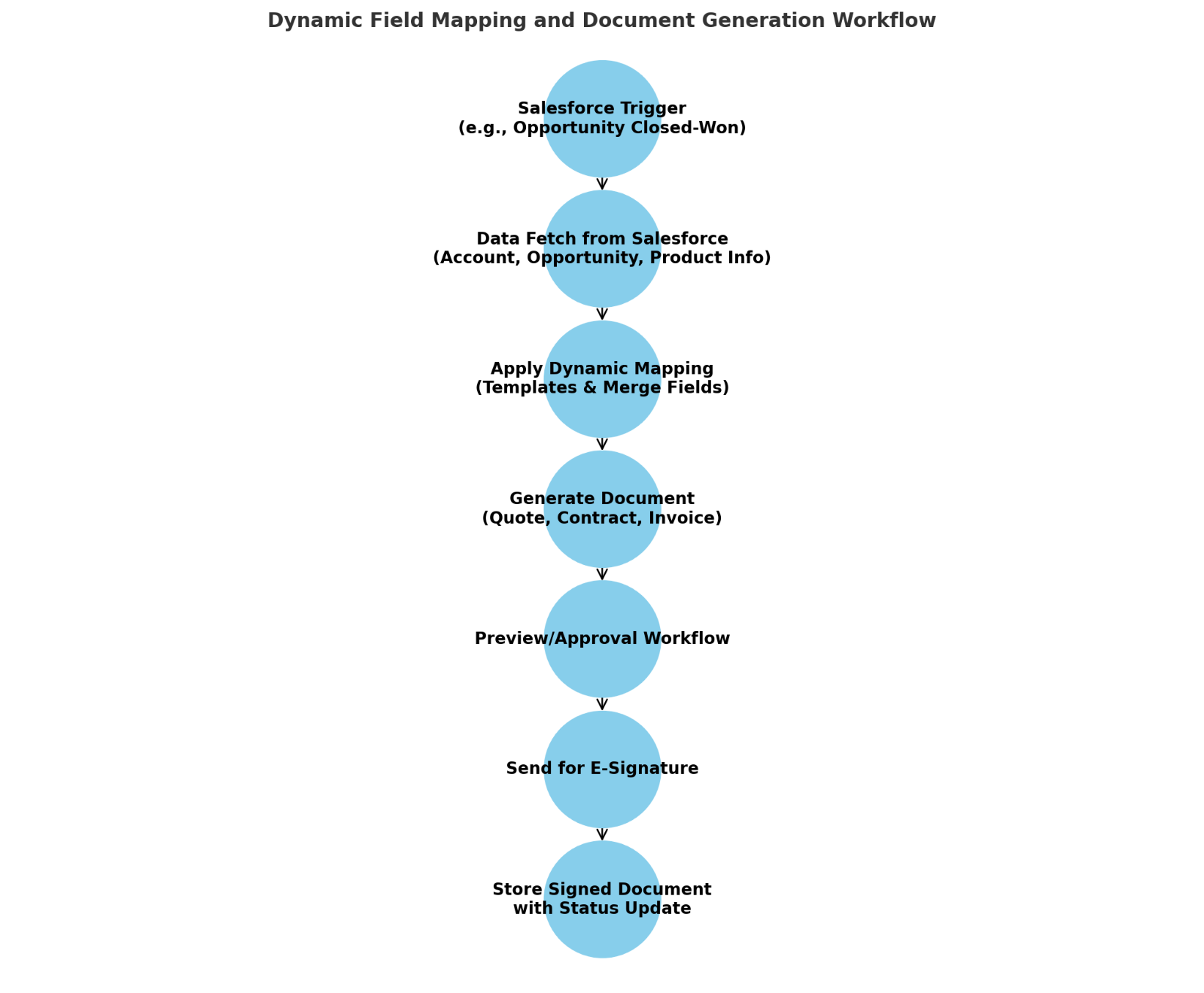
When a defined event occurs in Salesforce (e.g., opportunity marked as Closed-Won), an automated trigger initiates document creation.
Technical Flow:
Before sending, users can preview documents directly within Salesforce.
Example: A quote is generated, sent for signature via DocuSign, and once signed, the document is saved to the opportunity record with status updates.
Data from Salesforce maps directly to predefined templates using dynamic bindings.
For example, opportunity-related fields populate quotes automatically.
Technical Diagram:
|
Field in CRM |
Corresponding Document Field |
|
Account Name |
Customer Name (Header Section) |
|
Opportunity Amount |
Total Quote Value (Summary Section) |
|
Product Line Items |
Table of Products with Descriptions, Unit Price, and Totals |
|
Metric |
Manual Workflow |
Automated Workflow |
Improvement |
|
Time to generate a contract |
~45 minutes (data entry, review) |
~5 minutes |
80% reduction |
|
Signature turnaround time |
~3-5 days (email follow-ups) |
~1 day (automated reminders) |
50% faster completion |
|
Error rate in document creation |
8-10% due to manual errors |
<1% due to direct CRM integration |
Near elimination of errors |
|
Industry |
Use Case |
Advanced Workflow |
|
Financial Services |
Loan applications, investment proposals, and insurance policy documents |
Dynamic templates pulling applicant data, loan amounts, and terms directly from CRM |
|
Healthcare |
Patient intake forms, diagnostic reports, and insurance claim submissions |
Automatically generated patient forms based on case history |
|
B2B Sales |
Quotes, contracts, and multi-product invoices |
Auto-filled multi-line item quotes and contracts based on product catalogs |
During our webinar, we highlighted how financial institutions leverage document automation:
Document automation using Salesforce isn’t just about speeding up workflows—it’s about creating reliable, scalable, and error-free processes.
Businesses that invest in automation see: Faster document turnaround times Reduced operational costs Improved customer satisfaction
What is Salesforce document generation?
It is creating business documents automatically from Salesforce data and templates, things like proposals, contracts, quotes, and invoices, without rekeying information.
How can businesses automate document generation using Salesforce?
Connect Salesforce records to document templates and workflows so documents generate from a business event or a user action, not manual effort.
What types of business documents can be generated automatically from Salesforce?
Commonly proposals, quotes, contracts, invoices, statements, and reports. The right set depends on your processes and the solution you choose.
How does automated document generation reduce errors and improve operational efficiency?
Pulling data straight from Salesforce removes repetitive manual entry, and standardized templates keep every document consistent. Fewer hands on the document means fewer mistakes.
Document creation is a critical business process that can quickly become complex and time-consuming.
Read More about Simplifying Document Generation with Salesforce AppExchangeContracts influence far more than the moment a deal is signed. They can define
Read More about Are Your Most Valuable Commercial Relationships Trapped in Unstructured Data?Your Salesforce environment didn't start with a blank page. It has years of data
Read More about How to Build an Agentforce Strategy for Enterprise Salesforce